How to join a KeyDrop giveaway
To join a KeyDrop giveaway, open the live giveaway list, choose an active event, review its minimum-deposit and timing requirements, open the giveaway detail page and confirm that your account has received entries. Participation happens on KeyDrop, not on this website. A visible giveaway card does not mean that every account is eligible, and an entry does not guarantee a prize.
- Sign in to your KeyDrop account.
- Open the Giveaways section.
- Find an active creator giveaway.
- Check the minimum deposit and qualifying period.
- Open the giveaway and confirm your entries.
1. Find an active KeyDrop giveaway
Start on KeyDrop's giveaway list and make sure the Active filter is selected. The search field can be used to find giveaways connected with a creator code. For example, entering the featured creator code on this site displays the active giveaways returned for that creator.
Do not choose a giveaway only because the pictured CS2 skin looks valuable. Read the entire card. Important information can include the listed prize value, minimum qualifying deposit, participant count and time remaining. These figures can change, and the individual giveaway page is the final reference.
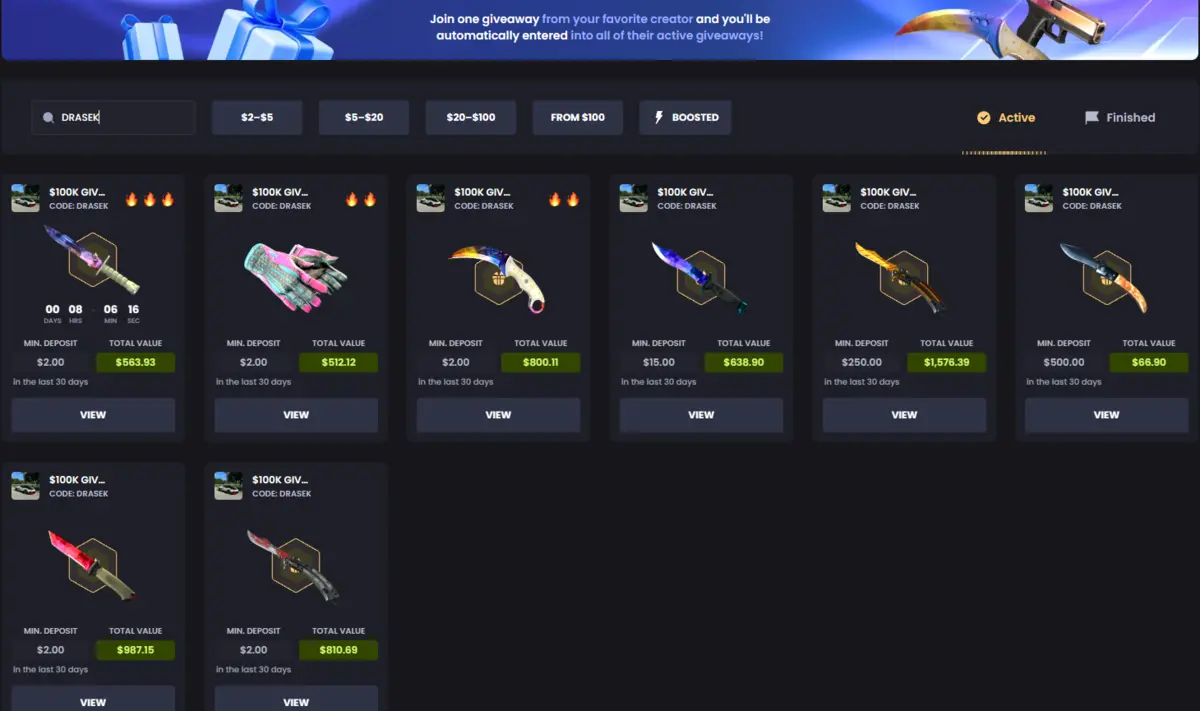
If an event is marked as finished, do not assume that a deposit will create an entry. Return to the active list and select a giveaway that is still accepting participation.
2. Read the giveaway requirements before depositing
Each giveaway can have a different minimum deposit. One event may require a small qualifying amount while another may require a much larger amount. The amount shown on one card must not be treated as a site-wide KeyDrop rule.
Also check the qualifying period. A giveaway may count deposits made during a stated recent period rather than every deposit ever made on the account. If your account activity falls outside that period, it may not produce an entry even when your lifetime deposit total is higher.
3. Open the giveaway and confirm the live details
Select the giveaway's View control to open its detail page. The page should identify the creator, show the remaining time, list the prize or prizes and explain the qualifying deposit. It may also display how many entries your account currently has.
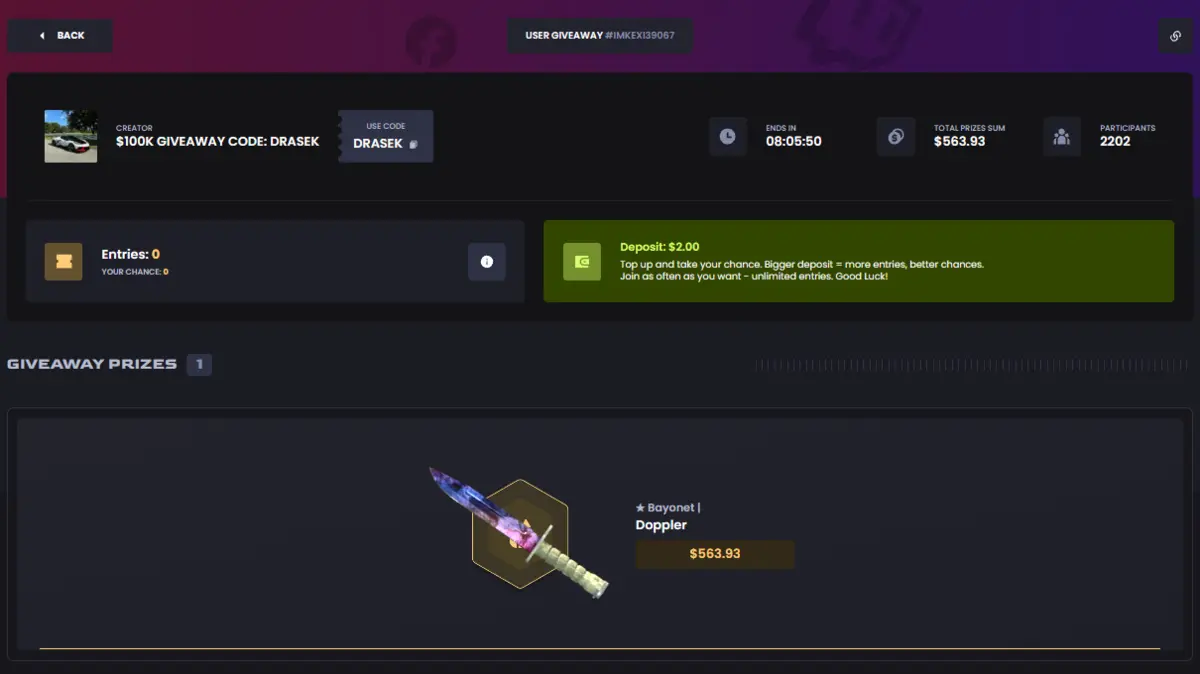
Read this page from top to bottom. If your entry count is zero, do not assume that opening the page has entered you automatically. Check whether the stated deposit condition has been met and whether KeyDrop displays a confirmation or updated entry count.
4. Understand entries, chances and winners
An entry is a chance to participate; it is not a reserved prize. Giveaways can have many participants, and the number of entries may differ between accounts. The live giveaway interface explains how deposits translate into entries for that specific event.
Participant totals and prize values can move while the giveaway is active. A displayed skin value is a platform listing value and should not be interpreted as a guaranteed cash payment. When the event ends, use KeyDrop's result and winner information rather than screenshots copied to another website.
What if the card has no clear end time?
Occasionally, a feed may not return a usable deadline. Our homepage labels that situation instead of inventing a countdown. Open the event directly on KeyDrop and check its current status. If the platform does not provide a clear deadline, do not make a financial decision based on an estimated time.
5. Use this safety checklist
- Confirm that the giveaway is active on KeyDrop.
- Check the exact minimum deposit and qualifying period.
- Verify that your account and country are eligible.
- Look for an entry count or confirmation inside your account.
- Never send anyone your Steam password or authentication code.
- Never install an unknown browser extension to claim a giveaway.
- Remember that an entry does not guarantee a win.
- Set a spending limit and never chase losses.
This is an independent affiliate guide. We can explain the interface and show the latest stored giveaway cards, but we cannot create entries, select winners or change KeyDrop's rules.
Frequently asked questions
Do I join the giveaway on this website?
No. The cards on our homepage link to KeyDrop. All account actions and participation take place on KeyDrop.
Does using a creator code automatically enter every giveaway?
Do not assume automatic eligibility. Read the message displayed by KeyDrop and check your account's entry count. Creator promotions and giveaway requirements can change.
Why do different giveaways show different minimum deposits?
Giveaways are separate events with their own conditions. Always follow the requirement on the individual live page.
Can I win without meeting the deposit requirement?
If an event requires a qualifying deposit, the account normally needs to satisfy the stated condition before entries are recorded. Check the live rule and account confirmation.
Are giveaway prizes guaranteed?
No. Participation provides a chance under the platform's rules. It does not guarantee a prize, profit or cash value.